Multi-Room Management for interior designers
Every room has its own story. Liru keeps them all straight.
Sign up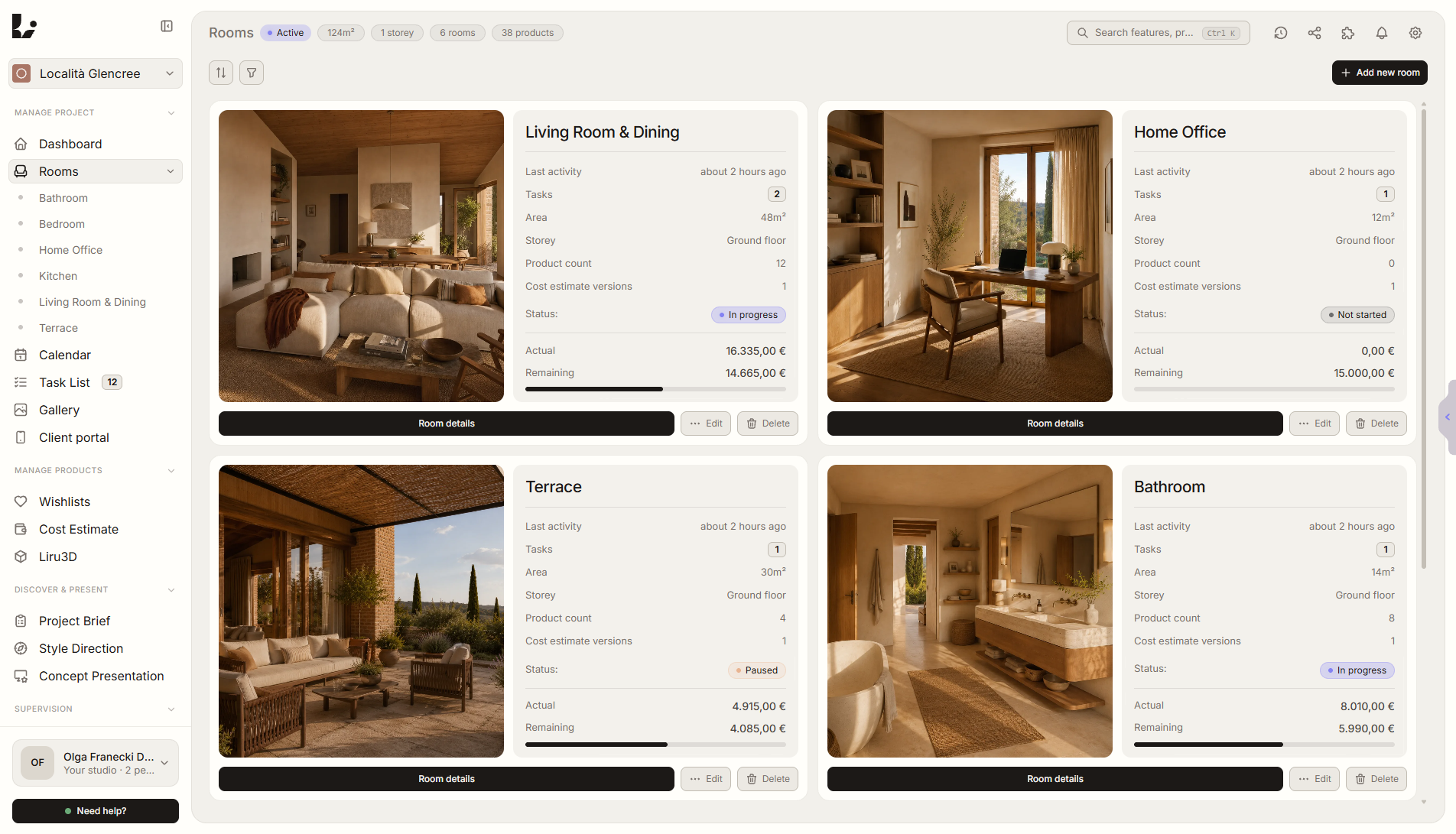
Feature overview
Where this fits in the project
Real interior design projects have kitchens, living rooms, bedrooms, bathrooms, and hallways – each with its own budget, products, tasks, and client feedback. Liru organizes everything per room so nothing falls through the cracks.
Multi-Room Management keeps the project in the natural structure of interior design work. Every room has its own products, requirements, budget, inspirations, and status.
What it gives you in practice
How it works step by step
You add rooms, assign products and tasks, then run presentations and budget decisions in the context of specific spaces.
Add rooms to your project
Choose from 12 types, set area, floor, and budget per room.
Assign products and tasks
Everything is organized per room – no spreadsheet juggling.
Track progress per space
Each room has its own status, budget, and task list.
Present room by room
Presentations, moodboards, and briefs are all room-aware.
Related features
These modules usually work together when you run a real project from brief to approval.
Every room under control, entire project in one place.
Choose a plan and start running your project in Liru.
Sign up